SQL performance: automated detection & testing (part 3)
Published on January 25, 2026 by Mattias Geniar

This is the final part of our 3-part series on SQL performance improvements. In part 1, we covered how to identify slow queries. In part 2, we explored how to fix them with indexes. In this post, we'll share how we prevent those performance issues from ever reaching production again.
A few weeks ago, we massively improved the performance of the dashboard & website by optimizing our SQL queries. The improvements were significant - but how do we make sure we don't accidentally undo all that work with future code changes?
In this post, you'll see:
- The problem: performance regressions slip through
- The solution: test-driven SQL performance
- Installing the package
- Quick start: the one assertion you need
- Detecting duplicate queries
- Catching N+1 / lazy loading issues
- Verifying index usage
- Query count thresholds
- Multi-connection support
- The paranoid mode: automatic checks on every test
- Real-world results from Oh Dear
- What this won't catch
Let's go!
What these results look like #
Before diving into the tooling, here's what we've achieved by implementing automated SQL performance testing:
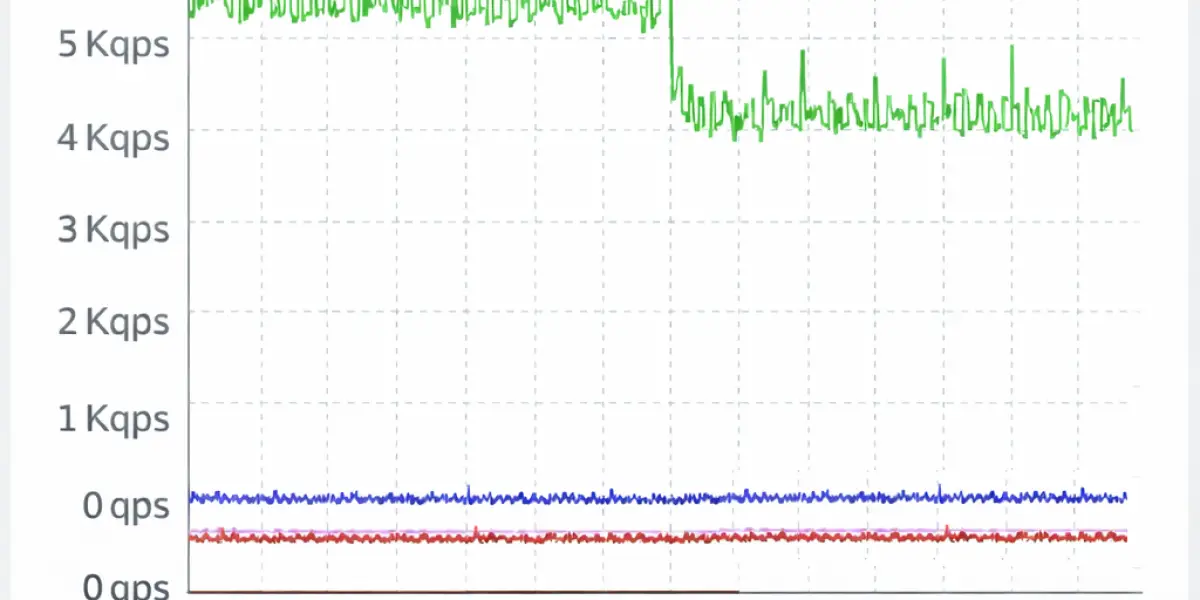
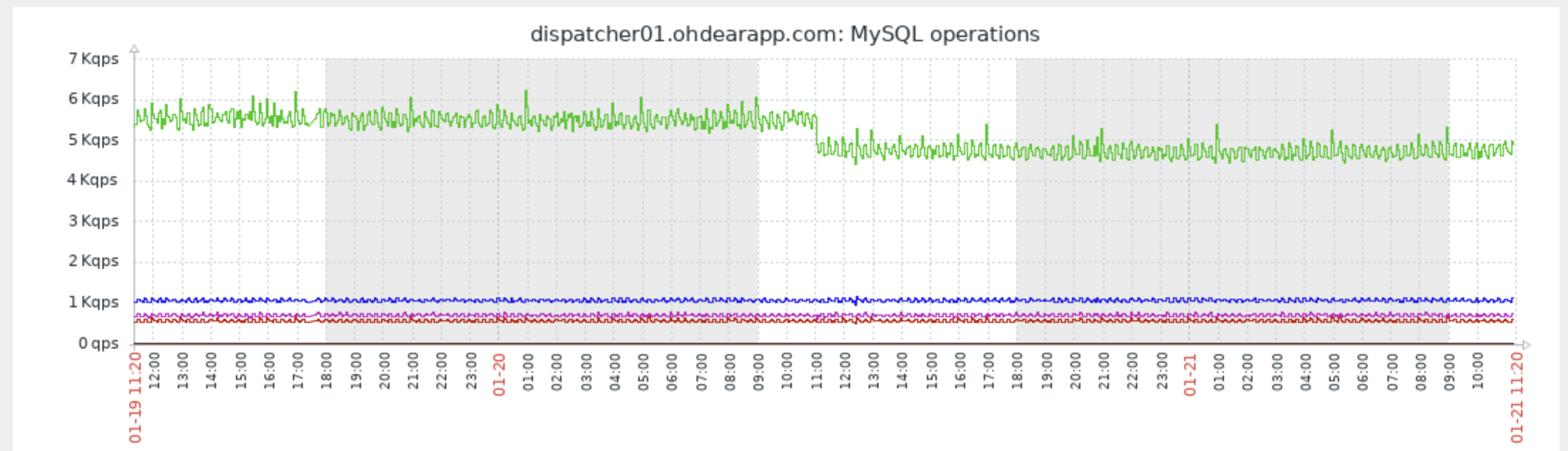
We eliminated over 15% of our SQL read queries by catching duplicate queries that slipped through manual code review. These weren't obvious N+1 loops - they were subtle cases where the same query was executed in different parts of the request lifecycle.
We've caught index regressions in CI before they hit production. When a developer removes an index in a migration or writes a query that can't use existing indexes, the tests fail with a clear message explaining why.
The feedback loop is immediate: write code, run tests, see if your queries are efficient. No more waiting for production metrics to reveal problems days or weeks later.
The problem: performance regressions slip through #
Here's a scenario we've all experienced: you spend time optimising queries, ship the improvements, celebrate the faster response times - and then a few weeks later, performance starts degrading again.
Why? Because nothing was preventing new inefficient queries from being introduced. Code review helps, but reviewers don't always catch:
- Duplicate queries executed in different service classes
- Lazy loading that only triggers with certain data combinations
- Missing indexes on new columns added in migrations
- Queries that worked fine on small datasets but don't scale
The problem isn't fixing performance issues - we covered that in parts 1 and 2. The problem is keeping them fixed.
The solution: test-driven SQL performance #
We built a package that lets us assert SQL performance characteristics in our test suite. When tests run (locally or in CI), they fail if queries are inefficient.
The package is called phpunit-query-count-assertions and it's available on GitHub. We've been using it internally at Oh Dear for months, and it's caught more issues than we'd like to admit.
Here's the core idea: wrap your code in a tracking block, then assert that the queries were efficient.
$this->trackQueries();

app(CertificateHealthChecker::class)->perform($run);

$this->assertQueriesAreEfficient();
That single assertion checks for N+1 queries, duplicate queries, and missing indexes - all at once.
Installing the package #
The package requires PHP 8.2+ and Laravel 11 or 12. Install it as a dev dependency:
$ composer require --dev mattiasgeniar/phpunit-query-count-assertions
Then add the trait to your test class:
use Mattiasgeniar\PhpunitQueryCountAssertions\AssertsQueryCounts;

class CertificateHealthCheckTest extends TestCase
{
    use AssertsQueryCounts;
}
That's it. No configuration files, no service providers - just a trait.
Quick start: the one assertion you need #
For most cases, assertQueriesAreEfficient() is all you need. It combines three checks into one:
- No lazy loading - catches N+1 queries
- No duplicate queries - same query shouldn't run twice
- All queries use indexes - no full table scans
Here's a real example from our certificate health checker tests:
public function test_health_checker_is_efficient(): void
{
    // Setup - create test data (these queries aren't tracked)
    $certificate = Certificate::factory()->expired()->create();
    $run = new InMemoryRun();

    // Track only the code under test
    $this->trackQueries();
    app(CertificateHealthChecker::class)->perform($run);
    $this->assertQueriesAreEfficient();
}
The key insight: call trackQueries() after your test setup. Factory calls and seeders execute queries too - we don't want those triggering false positives.
When something fails, you get actionable output:
Query efficiency issues detected:

Lazy loading violations detected:
Violations:
  1. App\Models\Certificate::$site
  2. App\Models\Certificate::$site

Duplicate queries detected:
  1. Executed 2 times: SELECT * FROM sites WHERE id = ?
     Bindings: [42]
     Locations:
       #1: app/Checkers/CertificateHealthChecker.php:67
       #2: app/Checkers/CertificateHealthChecker.php:89
The locations tell you exactly where each query was triggered - no more guessing.
Detecting duplicate queries #
Duplicate query detection is surprisingly powerful. It catches cases that aren't traditional N+1 loops but still waste database resources.
$this->assertNoDuplicateQueries(function () {
    // This code executes the same query twice
    $user = User::find(1);

    // ... 50 lines of other code ...

    $sameUser = User::find(1); // Duplicate!
});
The assertion considers bindings: User::find(1) and User::find(2) are different queries. But User::find(1) called twice is a duplicate.
When we first enabled this at Oh Dear, we found duplicate queries we'd missed in code review. The same Monitor model was being loaded in three different places during a single request - each time fetching from the database instead of reusing the already-loaded instance.
Fixing these duplicates removed over 15% of our SELECT queries.
Catching N+1 / lazy loading issues #
N+1 queries are the classic performance killer. You load a list of models, then loop through them accessing a relationship - triggering a new query for each iteration.
// This will fail
$this->assertNoLazyLoading(function () {
    $sites = Site::all();

    foreach ($sites as $site) {
        echo $site->checks->count(); // N+1 query!
    }
});
The fix is eager loading:
// This will pass
$this->assertNoLazyLoading(function () {
    $sites = Site::with('checks')->get();

    foreach ($sites as $site) {
        echo $site->checks->count();
    }
});
The package uses Laravel's built-in lazy loading prevention under the hood, so it catches exactly what Laravel would catch - but only within your test assertion, not globally.
Ps; if you only need the count, Site::withCount('checks')->get() is even more efficient since it doesn't load the related models at all.
Verifying index usage #
This is where it gets interesting. The package runs EXPLAIN on your queries and checks for performance red flags.
$this->assertAllQueriesUseIndexes(function () {
    Site::where('team_id', 1)->get();
});
If team_id doesn't have an index, you'll see:
Queries with index issues detected:

  1. SELECT * FROM sites WHERE team_id = ?
     Bindings: [1]
     Issues:
       - [ERROR] Full table scan on 'sites'
     Locations:
       #1: tests/Feature/SiteTest.php:42
The severity levels help prioritise:
| Severity | Meaning |
|---|---|
[ERROR] |
Critical: full table scans, unused available indexes |
[WARNING] |
Potential issue: filesort, temporary tables |
[INFO] |
Informational: low filter efficiency (non-failing) |
What gets detected
For MySQL and MariaDB:
- Full table scans (
type=ALL) - Full index scans (
type=index) - Index available but not used
- Using filesort
- Using temporary tables
- Using join buffer (missing index for joins)
For SQLite (useful for fast local tests):
- Full table scans (
SCAN table) - Temporary B-tree usage
- Foreign key constraint check scans
Small table optimisation
Caution: full table scans on tiny tables (< 10 rows) are often faster than index lookups. The package ignores these by default - MySQL's optimiser knows what it's doing on small datasets.
If you need to adjust this threshold:
use Mattiasgeniar\PhpunitQueryCountAssertions\QueryAnalysers\MySQLAnalyser;

self::registerQueryAnalyser(
    (new MySQLAnalyser)->withMinRowsForScanWarning(100)
);
Query count thresholds #
Sometimes you want precise control over how many queries run:
// Exact count
$this->assertQueryCountMatches(3, fn() => $this->loadDashboard());

// Upper bound - useful for "don't make this worse"
$this->assertQueryCountLessThan(10, fn() => $this->loadDashboard());

// Range
$this->assertQueryCountBetween(5, 15, fn() => $this->complexOperation());

// No queries at all (cached responses)
$this->assertNoQueriesExecuted(fn() => $this->getCachedData());
When assertions fail, you see exactly what ran:
Expected 3 queries, got 5.
Queries executed:
  1. [0.45ms] SELECT * FROM users WHERE id = ?
      Bindings: [1]
      Locations:
        #1: app/Services/Dashboard.php:42
  2. [0.32ms] SELECT * FROM sites WHERE user_id = ?
      ...
The timing information helps identify which queries are worth optimising - a 0.3ms query that runs once matters less than a 0.1ms query that runs 100 times.
Multi-connection support #
If your application uses read replicas, separate analytics databases, or tenant-specific connections, you'll appreciate this: trackQueries() captures queries from all database connections by default.
$this->trackQueries();

DB::select('SELECT 1');                         // Tracked
DB::connection('replica')->select('SELECT 2');  // Also tracked

$queries = self::getQueriesExecuted();
// $queries[0]['connection'] === 'mysql'
// $queries[1]['connection'] === 'replica'
Each tracked query includes its connection name, so you can verify queries are hitting the right database.
Filtering to specific connections
Sometimes you want to focus on just one connection - maybe your test setup runs migrations on a different connection that you don't want to count:
// Track only the replica connection
$this->trackQueries('replica');

// Track multiple specific connections
$this->trackQueries(['mysql', 'replica']);
This is useful when:
- Your test setup runs queries on different connections that you don't want to count
- You want to verify that specific queries go to the right connection
- You're debugging connection routing in read/write split setups
At Oh Dear, we generally track all queries, across all connections.
The paranoid mode: automatic checks on every test #
If you want to enforce query efficiency across your entire test suite, you can enable automatic checking in beforeEach and afterEach hooks.
For Pest (in tests/Pest.php):
use Mattiasgeniar\PhpunitQueryCountAssertions\AssertsQueryCounts;

pest()->extend(Tests\TestCase::class)
    ->use(AssertsQueryCounts::class)
    ->beforeEach(fn () => self::trackQueries())
    ->afterEach(fn () => $this->assertQueriesAreEfficient())
    ->in('Feature');
For PHPUnit (in your base test class):
abstract class TestCase extends BaseTestCase
{
    use AssertsQueryCounts;

    protected function setUp(): void
    {
        parent::setUp();
        $this->trackQueries();
    }

    protected function tearDown(): void
    {
        $this->assertQueriesAreEfficient();
        parent::tearDown();
    }
}
I know some will #YOLO this on their entire test suite - don't @ me when hundreds of tests suddenly fail. Consider starting with a subset of critical tests first. Keep in mind this might trigger warnings for queries executed purely during the setup and seeding of the tests, although you can make an argument efficiency matters then, too.
Real-world results from Oh Dear #
Here's what we've caught since implementing this:
Duplicate query in the Scheduled Task Checker: Our scheduled task checker called ->refresh() twice on the main model, to ensure we operate on all the received pings in our checker. This was a legacy from our older setup, before we refactored it to our new setup more than a year ago. The refresh() was needed in the old system, not our new one, so we could safely clean it up. This is hard to spot, because the code never broke, it was just being a little too aggressive in refreshing state.
N+1 in certificate expiry notifications: When sending expiry warnings, we were lazy-loading the team for each certificate instead of eager loading. Only triggered when multiple certificates expired simultaneously - exactly the kind of edge case that slips through manual testing.
The pattern is clear: these aren't bugs that crash the application. They're inefficiencies that slowly accumulate until someone notices "the app feels slower than it used to."
What this won't catch #
Let's be honest about the limitations. This package catches a lot, but it's not a silver bullet.
Small dataset blindspot: By default, the package ignores full table scans on tables with fewer than 10 rows. MySQL's optimiser often chooses to scan tiny tables because it's faster than an index lookup. This means your tests - which typically have small datasets - might pass while production (with millions of rows) suffers.
EXPLAIN isn't execution: The index analysis runs EXPLAIN on your queries, which shows MySQL's plan, not what actually happened. In rare cases, the plan and reality diverge - especially with complex joins or when statistics are stale.
Timing is unreliable in tests: Query timing assertions (assertMaxQueryTime) work, but test databases are usually local SSDs with no contention. A query that runs in 5ms locally might take 500ms in production under load.
You need representative test scenarios: If your test only creates one user with one site, you won't catch the N+1 that only triggers when a user has multiple sites. The package can only catch what your tests actually exercise.
That said, we've found it catches roughly 80% of performance issues before they reach production. The remaining 20% still need production monitoring - but that's a much smaller haystack to search through.<@
Wrapping up #
The three-part journey is complete:
- Part 1: Find slow queries using debug bars, slow query logs, and process monitoring
- Part 2: Fix them with proper indexes
- Part 3: Keep them fixed with automated testing
The package is open source and available at github.com/mattiasgeniar/phpunit-query-count-assertions. We'd love to hear how it works for your applications.
Automated regression testing pairs naturally with continuous performance monitoring in production.
Feedback? #
If this article contains any errors or if it should clarify certain sections more, do reach out via either mattias@ohdear.app or ping me via @mattiasgeniar or our @OhDearApp account. Any feedback is appreciated!
Curious to hear about performance issues you've caught with automated testing that we don't yet know about!