ntfy
You can configure notifications to be sent via ntfy, the open-source HTTP-based pub-sub notification service. ntfy lets you receive push notifications on your phone, desktop, or any device that can subscribe to a topic.
Getting started #
This guide assumes you've followed our Getting Started documentation to know where you can configure your notifications.
What is ntfy? #
ntfy (pronounced "notify") is a simple HTTP-based pub-sub notification service. You publish messages to topics, and anyone subscribed to that topic receives the notification. It's open-source and works with both the hosted service at ntfy.sh and self-hosted instances.
Important: topic security #
Topics function as passwords in ntfy. There is no signup process; topics are created automatically when first used. This means:
- Anyone who knows your topic name can subscribe to it and read your notifications
- Anyone who knows your topic name can publish messages to it
- Topics on ntfy.sh are public by default
We strongly recommend:
- Use a long, random, hard-to-guess topic name (e.g.
oh-dear-mycompany-alerts-8j3k9m2x) - Use an access token on ntfy.sh for an extra layer of protection
- Or use a self-hosted ntfy instance with proper authentication
Subscribe to a topic in the ntfy app #
Install the ntfy app on your iPhone, Android device, or desktop.
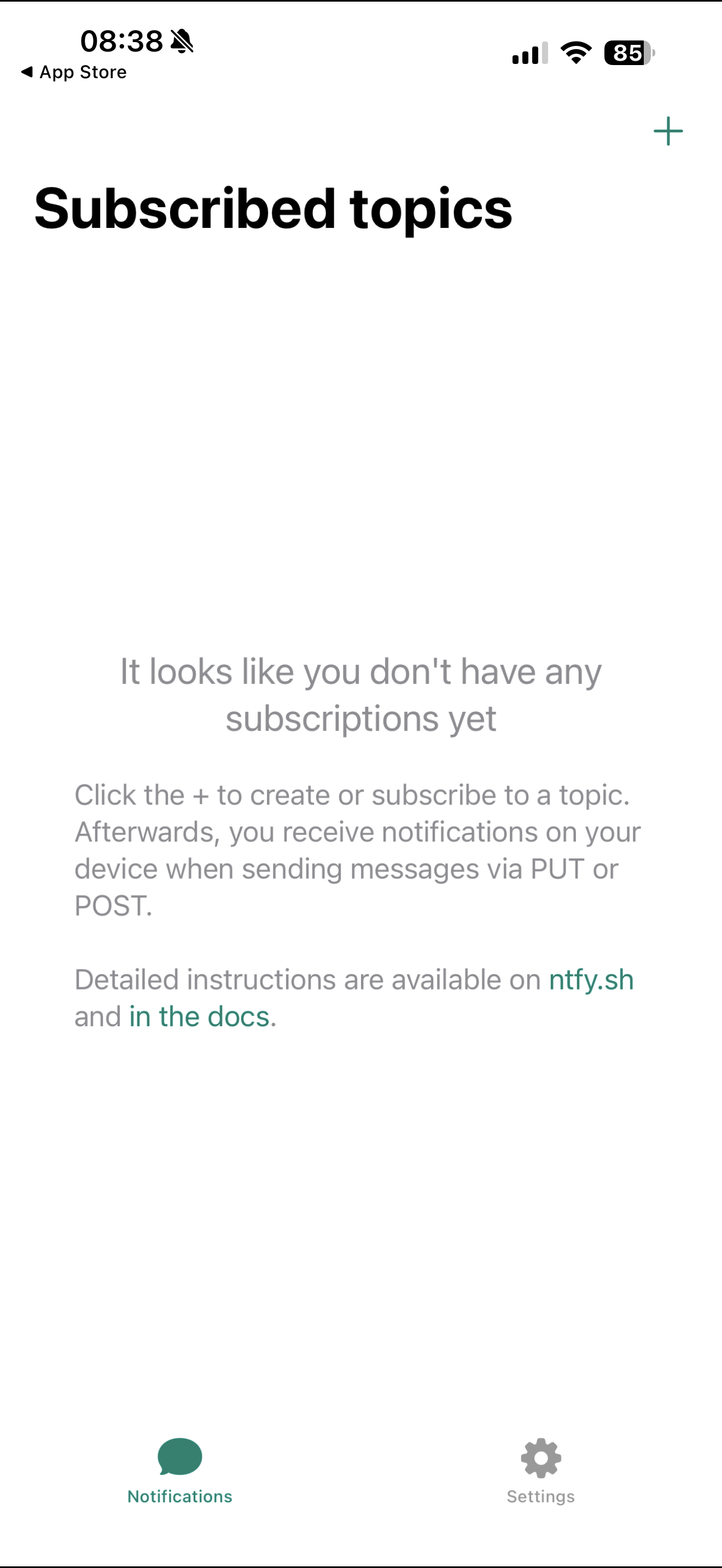
When you open the app, you'll see an empty list of subscribed topics. Tap the + button to add a new subscription.
Enter your topic name. Remember to choose something hard to guess. The app itself reminds you that "topics may not be password-protected, so choose a name that's not easy to guess".
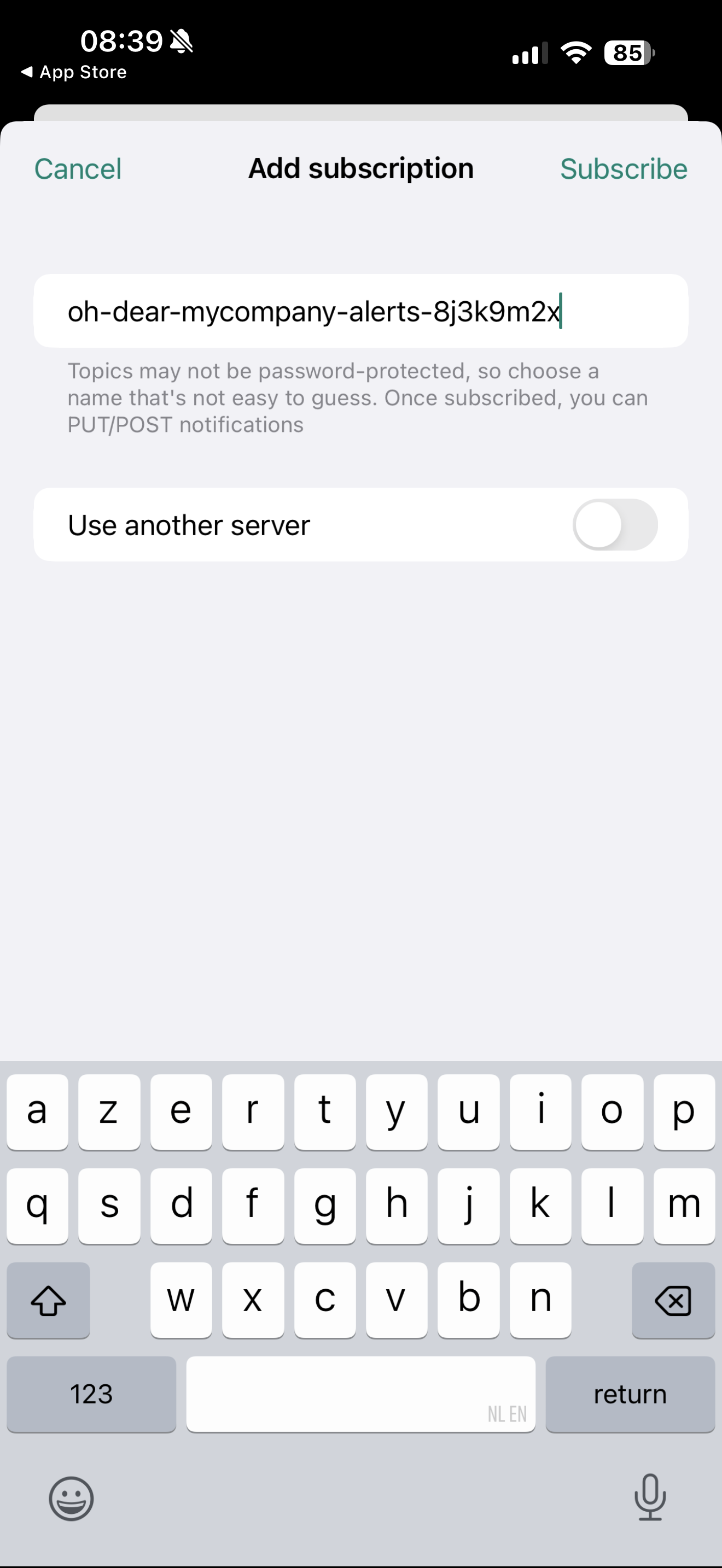
If you're using a self-hosted ntfy server, toggle Use another server and enter your server URL.
Configure ntfy in Oh Dear #
Head over to the Oh Dear notifications screen and add a new ntfy notification destination.
You'll need to configure the following:
- Server URL: The ntfy server to send notifications to. Defaults to
https://ntfy.sh. - Topic: The topic name that your devices are subscribed to. Use the exact same name you entered in the ntfy app.
- Access Token (optional): If your ntfy server or topic requires authentication, add your access token here.
- Priority: The priority level for notifications. See the priority levels section below.
Priority levels #
ntfy supports five priority levels that control how notifications appear on your devices:
| Priority | Behavior |
|---|---|
| Max | Urgent alerts with long vibration bursts and pop-over notifications |
| High | Important alerts with vibration and pop-over |
| Default | Standard notifications with sound and vibration |
| Low | No sound or vibration, shown in the notification drawer |
| Min | Silent, shown below other notifications |
We recommend using Default for most alerts. If you want critical downtime notifications to stand out, consider creating a separate ntfy destination with High or Max priority.
Using access tokens #
For better security, you can protect your ntfy topic with an access token. This is supported on both ntfy.sh and self-hosted instances.
To create an access token on ntfy.sh:
- Create a free account at ntfy.sh
- Go to Account → Access tokens
- Click Create access token
- Copy the token (it starts with
tk_) and paste it into the Oh Dear access token field
With an access token, only authenticated clients can publish to or read from your topic.
Hosted vs. self-hosted #
Oh Dear works with both the hosted ntfy.sh service and your own self-hosted ntfy instance:
- Hosted (ntfy.sh): No setup required. Use
https://ntfy.shas the server URL (this is the default). Free for up to 250 messages per day. - Self-hosted: Full control over your notification infrastructure. Your notifications never leave your network, and you can configure authentication exactly how you want. Enter your own server URL, e.g.
https://ntfy.example.com. See the ntfy installation guide to set up your own server.
Testing the ntfy alerts #
Head over to the Send test tab to test the alert and you're all set!
Feel free to reach out via support@ohdear.app or on X via @OhDearApp if you have any other questions. We'd love to help!
